

Developer’s Corner: Customizable arrow in GeoServer

Dear Reader,
Today we want to share a recent development in GeoServer: an arrow mark whose proportions can be customized to get the type of arrow you’re looking for.
The general syntax for this arrow mark is the following:
<WellKnownName>extshape://arrow?hr=[hrValue]&t=[tValue]& ab=[abValue]</WellKnownName>
All parameters are ratios, and they are all optional. By default the arrow is the usual 1 by 1 mark, whose actual size you can control in SLD via the Mark size attribute. In particular, the parameters and their default values are:
- t: thickness of the arrow base, between 0 and 1, default is 0.2
- hr: height over width ratio, a positive number, default is 2
- ab: arrow head base ratio, between 0 and 1, default is 0.5
The values can be modified to change the proportions of the arrow, for example, varying t between 0 and 1 results in the following arrows:

Changing the height to width ratio will generate arrows that are wider or thinner:

Finally, changing the arrow head base will move the position where the head of the arrow starts:

Playing with all the three parameters will allow you to get the arrow of the desired proportions. Now, what if your desired characteristic is just having a long arrow? Since size is controlled by the mark size attribute, you’ll have to make a big arrow whose height ratio makes for a thin one, and maybe push up a bit the arrow base, like in this example:
<?xml version=”1.0″ encoding=”ISO-8859-1″?>
<StyledLayerDescriptor version=”1.0.0″
xsi:schemaLocation=”http://
xmlns=”http://www.opengis.
xmlns:ogc=”http://www.
xmlns:xlink=”http://www.w3.
xmlns:xsi=”http://www.w3.org/
<Name>ThinArrow</Name>
<Title>Thin long arrow</Title>
<Rule>
<Name>r1</Name>
<PointSymbolizer>
<Graphic>
<Mark>
<WellKnownName>extshape://
<Fill>
<CssParameter name=”fill”>#000000</
</Fill>
</Mark>
<Size>40</Size>
</Graphic>
</PointSymbolizer>
</Rule>
</FeatureTypeStyle>
</UserStyle>
</NamedLayer>
</StyledLayerDescriptor>
Which will result in the following arrows:
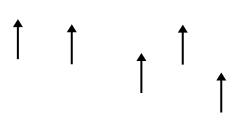
We would like to thanks the GEOS Fugro for funding this work under a GeoSolutions Enterprise Services support contract.
