

MapStore 2026.02.00 Release
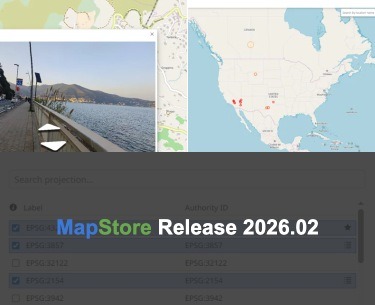
Here is a closer look at the highlights of the new series 2026.02 of MapStore, our flagship Open Source WebGIS product. On GitHub it is possible to consult the full list of new features, enhancements and fixes we have provided in version 2026.02.00. You can try it right away on the MapStore demo.
We would like to thank all contributors who made this release possible, in particular Municipality of Genoa, TotalEnergies, Open Groupe, University of Naples, KfW and Deutsche Bahn for their valuable contributions (the full list is available at the v2026.02.00 release page in Github).
The 2026.02.00 version introduces a wide range of enhancements focused on data source integration, catalog usability, projection management, and widgets flexibility. It represents another important step forward in evolving MapStore into a comprehensive platform not only for geospatial visualization, but also for the seamless integration of heterogeneous data sources and modern web-based analytical workflows.
Expanded Data Source Support
The v2026.02.00 release significantly broadens the range of data sources that MapStore can natively consume, further strengthening its role as an interoperable WebGIS platform.
A major addition is the introduction of ArcGIS FeatureService support, which allows vector data exposed through dedicated ArcGIS query endpoints to be visualized directly within MapStore. The implementation targets both OpenLayers and CesiumJS, and adopts a tile-based loading strategy that fetches features incrementally per grid cell rather than downloading the entire dataset at once. This approach provides natural spatial partitioning and ensures a good balance between performance and user experience, even when working with large FeatureServer datasets. This feature was made possible thanks to the contribution of the Municipality of Genoa.
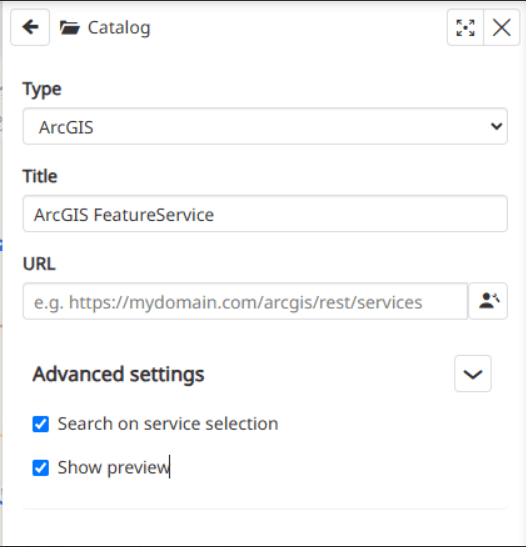
ArcGIS Feature Service
Alongside ArcGIS, the release also brings support for the FlatGeobuf format as a read-only remote layer type, with consistent behavior across the catalog, layer tree, map identify, and styling, including dynamic updates to feature styles. FlatGeobuf datasets can now be visualized both in 2D and 3D environments, thanks to the integration in both OpenLayers and CesiumJS map components. Complementing the initial integration, a set of dedicated FlatGeobuf enhancements introduces a configurable maxFeaturesInView option, which limits the number of features rendered in the current view to avoid performance issues when a map extent covers an entire large dataset. The setting is available both in the TOC layer settings and in the catalog’s advanced settings, and applies uniformly to OpenLayers and CesiumJS. The “Zoom to” action has also been enabled directly in the TOC for FlatGeobuf layers, aligning it with the existing user experience of the other layer types. Both the initial integration and these refinements were made possible thanks to TotalEnergies.
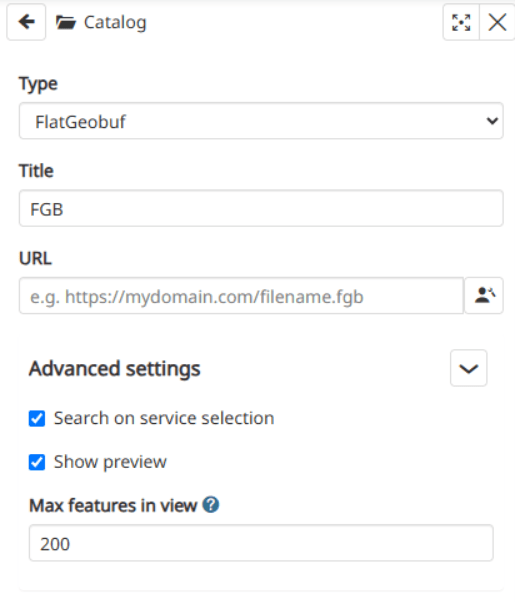
Support for the FlatGeobuf format
Furthermore, Panoramax is now available as a new provider for the Street View plugin, enabling users to explore street-level imagery served by the Panoramax API. The integration includes dedicated configuration options, localization support and proper attribution handling, further diversifying the sources of contextual imagery available in MapStore. This addition was contributed by Open Groupe.
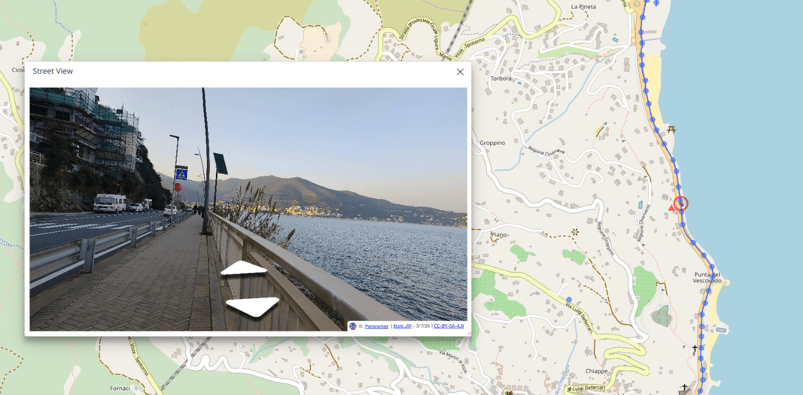
Panoramax as the new provider of the Street View plugin
A Redesigned Layer Catalog
With v2026.02.00 the layer catalog receives one of the most significant reworks of the release cycle, driven by both a UX and an architectural perspective.
The legacy MetadataExplorer plugin has been completely reworked and renamed to Catalog, adopting a refreshed layout and theme that reuses the resources catalog components already available in the platform. On top of the visual and structural rework, the new Catalog now natively supports the GeoNode API as a catalog service, alongside the other supported source types (e.g. WMS, WFS, WMTS, TMS etc.). This lays the groundwork for eventually retiring the separate custom catalog historically maintained inside GeoNode itself, moving toward a more unified experience across the two projects. The Catalog rework was made possible thanks to TotalEnergies.
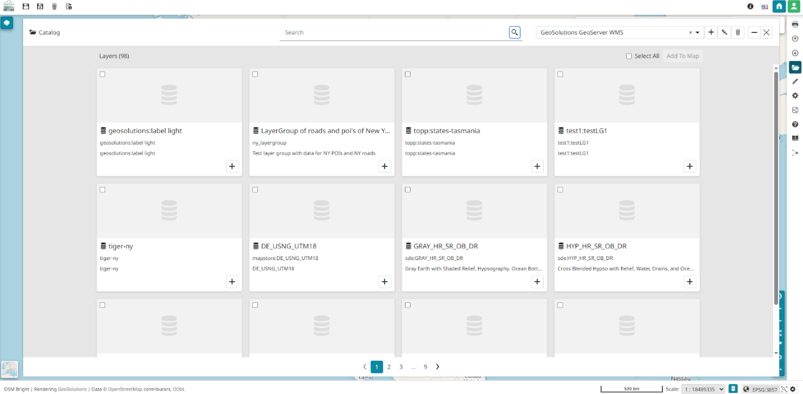
New Layer Catalog
The refactor is complemented by a set of targeted refinements, including:
- Improved spacing and layout in the catalog’s dialog mode.
- Removal of duplicated legacy catalog components, now centralized in the core.
- A fix preventing the catalog page from reloading and resetting when switching layout.
- Alignment of template and default catalog configuration, including the removal of the default COG service entry.
- A fix for GeoNode services showing the category identifier instead of its human-readable label on catalog cards.
Advanced CRS and Projection Management
Building on the CRS improvements delivered in the previous series, the 2026.02.00 release introduces the Dynamic Projection Definitions, a feature that connects MapStore’s coordinate reference system management directly to a GeoServer endpoint exposing thousands of standardized CRS definitions.
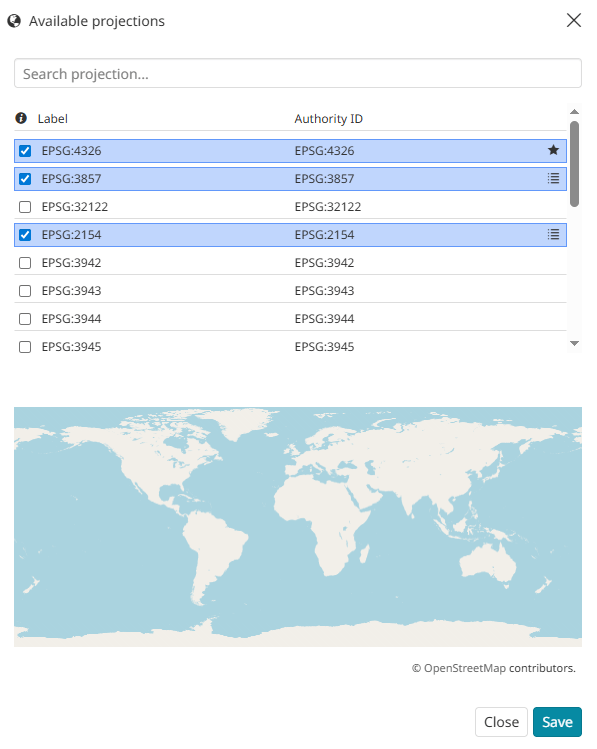
Dynamic Projection Definitions
Administrators and users with appropriate edit permissions can now search, add, and remove projections on demand directly from the CRS selector, without redeploying the application or manually editing configuration files. Existing statically configured projections continue to work exactly as before, ensuring full backward compatibility with current deployments. This is a particularly valuable improvement for organizations dealing with a large or evolving set of coordinate systems, where flexibility and rapid iteration are essential. This feature was made possible thanks to TotalEnergies.
Widgets and Timeline
The 2026.02.00 release continues to evolve MapStore’s widget experience, with a focus on flexibility, layout consistency and customizability.
This is especially useful for developing custom widgets thanks to a new Custom Widget type, now available thanks to the contribution of the University of Naples. Unlike the existing predefined widgets, each with its own dedicated builder, the new custom widget can render any component exposed by another plugin inside the Widgets container. Custom widgets can be expanded and minimized like any other widget, opening the door to fully bespoke dashboard content and enabling advanced customization scenarios for both developers and end users.
The Timeline plugin has also received a layout review, aligning it with the newly introduced layout structure delivered in recent releases. The plugin is now positioned in the bottom section rather than floating over the map, and both the expand/collapse control and the layout used when a time range is enabled have been refined for improved usability and visual consistency.
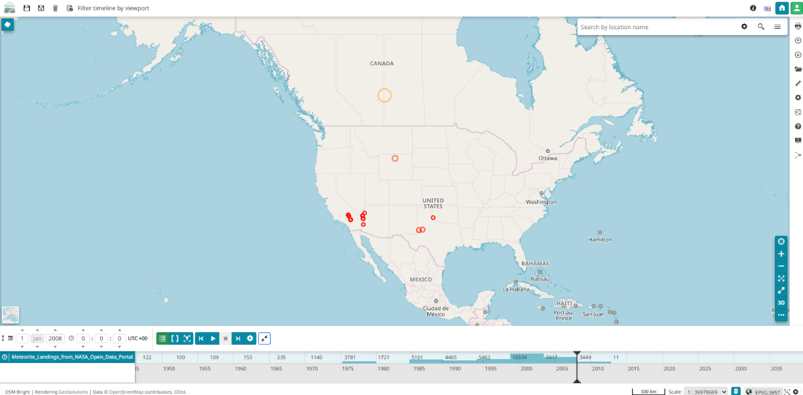
Timeline plugin
Greater Flexibility in Data Access and Configuration
Several improvements in this release address the way MapStore interacts with services and manages user access, providing administrators with finer-grained control.
Key highlights include:
- WMS Layer Extent Cropping Control: by default, MapStore crops WMS layers to the current map projection extent. A new option now allows users to let OpenLayers request tiles beyond that extent, configurable from the TOC display settings, the catalog’s advanced settings, and the background layer editor. This improvement was contributed by TotalEnergies.
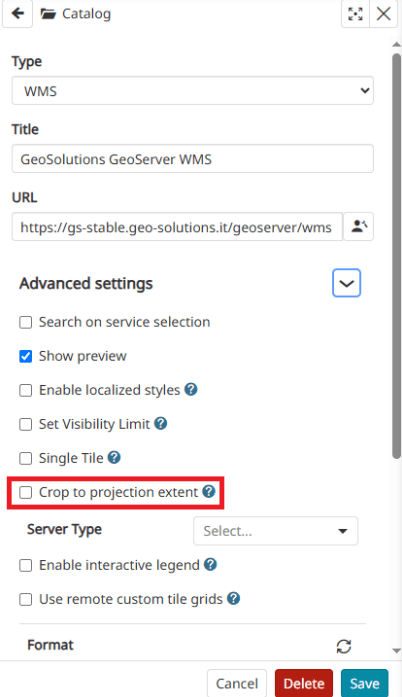
WMS Layer Extent Cropping Control
- Configurable Nominatim Geocoding Endpoint: the way the Nominatim geocoding endpoint URL is built has been restructured so that hostname and protocol can be overridden rather than remaining hardcoded. This makes it much easier for deployments to point to a custom Nominatim instance. This enhancement was contributed by Wolfgang Kaltz (@jwkaltz).
- Granular Permissions Control: mostly targeting GeoNode UI control, permissions now support a
disabledproperty that allows administrators to prevent selection, deletion, and modification of GeoLimits on specific permission rules when required. This feature was contributed by KfW.
All together, these changes make MapStore more adaptable to complex deployment scenarios and easier to integrate into enterprise environments with specific security and configuration requirements.
System and Infrastructure Updates
Beyond new features, the v2026.02.00 release brings a number of under-the-hood improvements aimed at making MapStore even more robust, maintainable, and easier to operate:
- User Session Cleanup on Account Deletion: deleting a user now automatically triggers the cleanup of any associated session records via a new backend cascade-delete parameter, preventing orphaned session data from accumulating in the database. This improvement was contributed by Deutsche Bahn.
- Official Project Entry Page: MapStore now has a more official project entry page at mapstore.io, acting as the project’s official landing page with relevant links and pointers, in line with similar entry points already available for other open source geospatial projects. An automated process has also been introduced to keep the page up to date across releases.
- Dependency Upgrades: the mapfish-print component has been updated to version 2.3.5 in line with the release calendar, and the GeoStore backend dependency used by MapStore has been migrated to version 2.6, together with revised authentication and setup documentation. A dedicated guide has been added and/or improved for configuring authentication (OIDC/Azure/Keycloak) for MapStore deployments.
All these updates contribute to a more robust, maintainable and transparent platform, while also improving the overall developer workflow and operational efficiency. These are just some of the many improvements introduced in the 2026.02 series, which continues to expand MapStore’s capabilities as a modern, flexible, and powerful WebGIS platform.
Stay tuned for future updates as we continue to enhance the MapStore project with new features and improvements in upcoming releases.
If you are interested in learning more about how we can help you develop a WebGIS using MapStore or help you achieve your needs with MapStore, GeoServer, GeoNode and GeoNetwork through our Enterprise Support Services, Professional Training Services and Subscription Services please contact us!
The GeoSolutions team,
